Alcatel Advanced REFLEXES (OmniPCX 4400) telephone
Introduction to Hardware Terminals
1. Display and Navigation (Navigator)
Two line text display screen, idle state displays time and date, programmable buttons; The call status displays the information of the other end and the currently available functions.
Navigator navigation keys: switch display pages, select up and down directions, and use soft keys to call corresponding functions; When receiving a message, the green LED indicator flashes to indicate.
2. Button system
Pre programmed buttons (8)+user programmable buttons (16), totaling 24 function keys
LINE line key, HOLD hold, FORWARD call forwarding, message, CALL LOG missed call record, REDIAL redial, STORE # temporary number storage;
Icon differentiation of call status: in call, hold, public hold; Status such as functional activation, operation required, and line occupancy.
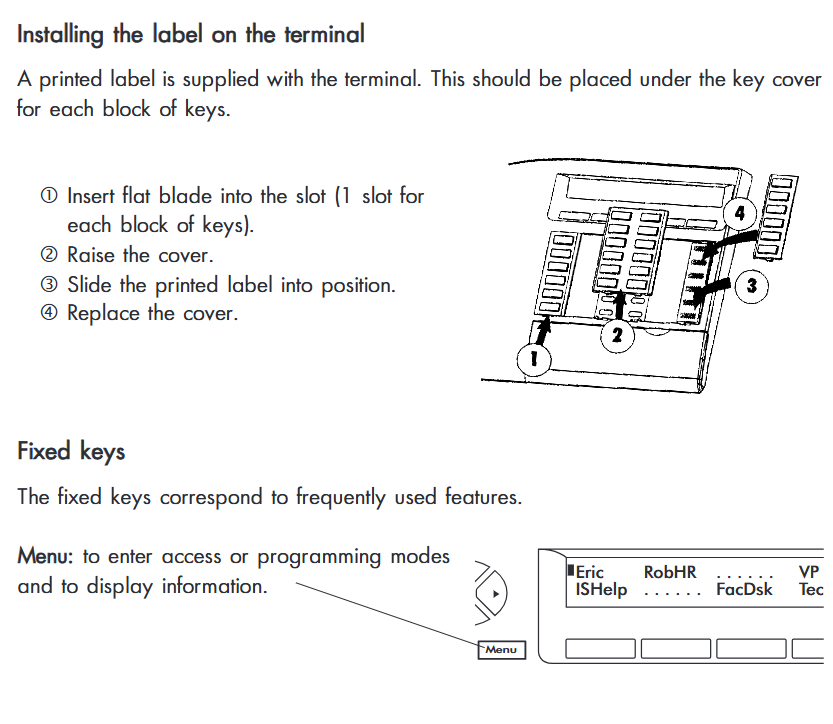
Replaceable paper label: pry open the button cover and insert the printed label paper.
Audio fixed button
Mute mute; Listen earpiece speaker; Speaker hands-free; END End call/programming; Volume adjustment;
Alphanumeric keyboard: used for text messages, dialing by name, and parameter programming.
Menu button: Enter boot mode and access all functional groups.
3. Two working modes
Multi line phone (described in this manual, with multiple line keys); Single line phones have no line buttons and operate differently.
Interphone intercom mode: The mute button LED flashes, and internal incoming calls are automatically hands-free connected without the need to pick up the receiver.
Processing of YOUR CALLS calls (all call related operations)
Basic call
Dial an external line: by default, dial 9 first, and then dial an external number; Dial the extension directly from the internal line; Call the switchboard and dial 0.
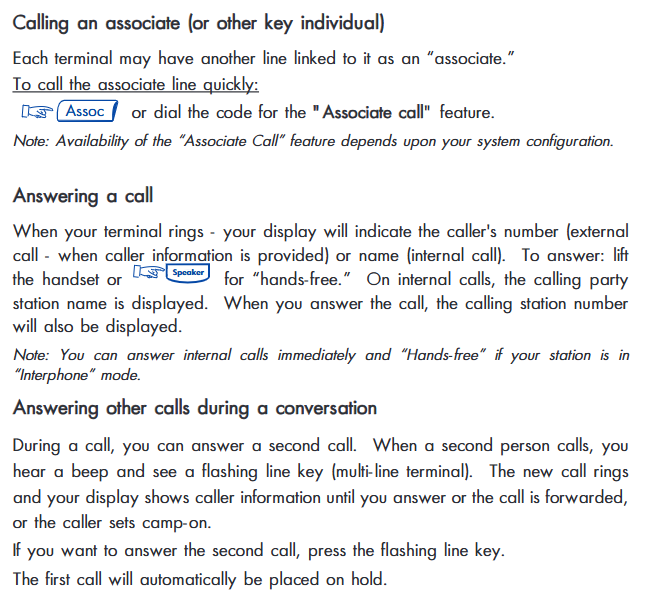
Answering incoming calls: Off hook/Speaker hands-free; The incoming call screen displays the caller’s name/number. When there is a new call during the call, you will hear a prompt sound. Press the flashing line button, and the original call will be automatically maintained.
Consultation Call: initiates a second call during the call process, and the original call is automatically maintained; Can end the second call and switch back to the original call.
Call operation
Call Transfer: After connecting a consultation call, transfer the incoming call to a third party without waiting for the other party to ring; External line transfer is limited by relay configuration.
Hold: Normal hold (retrieved locally); Common Hold: Any member in the group can retrieve the call, suitable for line finding/workgroups.
Broker Call: Switching back and forth between multiple calls. If the call is hung up and not answered, the phone will ring again as a reminder.
Call answering agent:
Same generation answer group: group representative answer;
Non group: directly answer on behalf of others+enter the ringing extension number.
Parking a call: Park an external line within the system and retrieve it from any other extension; If no one answers after timeout, it will automatically transfer to the switchboard.
Conference business
Tripartite Conference: Two party call joining a third party; If the initiator hangs up, all will be disconnected.
Casual Conference: Up to 6 parties, the initiator can continuously add new participants, and a prompt sound will be played for each person added.
Appointment for Meet-me meeting: up to 29 participants, access with password; External calls require internal users to transfer them to the conference; Support Moderated Controlled Host Mode.
Call assistance function
Callback request: If the other party is busy/unresponsive, submit a callback and the system will automatically ring your phone when the other party is idle.
Camp on busy waiting: dial the busy extension and wait for the other party to hang up before automatically calling your phone; You can also enable Camp on control to refuse others waiting.
Barge in Strong Insertion: When authorized, it can be inserted during a call; If the other party has enabled Privacy anti strong insertion, it cannot be inserted.
Hunt Groups: You can temporarily exit/rejoin the Hunt Groups; Direct dialing extension numbers are not affected by exiting the line finding group.
Number dialing methods: programmable key speed dialing, personal directory, system public speed dialing directory, dial by name (enter letters to search for extensions).
Message, paging, MLA multi line group
Sending text messages: sending pre-defined/custom text messages to internal extensions, up to 127 characters; Under ISDN conditions, it can be sent externally.
Leave a voice message directly: enter the other party’s voicemail without ringing; Call the BP machine and reply to the BP machine call.
MLA Multi Line Appearance: Multiple extension numbers are displayed on multiple phones simultaneously; Support group retention, private retention, and intra group transfer.
Night service bell: When the switchboard is not available, the extension responds to incoming calls from the switchboard.
EASE OF USE Easy to Use Features and Terminal Personalization
Entering the Menu boot mode, you can access 10 functional groups and program functions/numbers to programmable keys.
Top 10 Feature Groups: ① Call forwarding; ② Lock/Do Not Disturb DND; ③ Call answering agent; ④ Assistant related business; ⑤ Call back/billing; ⑥ Reminder alarm clock; ⑦ Voice mail; ⑧ Additional services; ⑨ Paging service; ⑩ Transparent transmission.
Terminal personalization settings
Programmable buttons: bind numbers and business functions to idle buttons; The system preset buttons cannot be overwritten or rewritten.
Personal code: default 0000, used to lock the phone and authenticate some services.
Display language selection, adjust screen angle; Ringtones: 16 melodies and ringtone volumes; 7-level volume adjustment for earpiece/speaker.
Personal speed dial directory, enter name and number; Edit and delete entries.
Common business
Hands free: supports dialing before off hook; Mute mute. Redial the previous number.
Do Not Disturb DND: Refuse all incoming calls except for the switchboard.
Appointment Reminder: Set up to 4 alarm reminders in a 24-hour clock format; Reminder will not follow call forwarding.
Associate number: Set assistant/backup numbers and support overflow transfer.
Number temporary storage STORE #: Store the number during a call and call back later.
Caller identity hiding: hide the local phone number when making external calls; You can also block the display of the caller’s identity.
Customer account code: Record the call to the project account; Check the duration and cost of the previous external call.
Private call: Enter PIN, personal phone bill will be charged separately, and the call cannot be transferred.
Twin Set configuration: Two phones share the same external number and ring simultaneously; Each machine retains independent partial configurations.
In Your Absence Not at the Workstation Business (All functions for leaving the seat)
Various types of call forwarding
Immediately transfer Immed: All incoming calls are immediately transferred to the target number.
No response transfer NoAns: If the alarm rings and no one answers, transfer.
Transfer ByNoA when busy/unresponsive.
Follow Me: Operate at another workstation and transfer your extension call to the current phone.
Remote Forward: You can set/cancel your extension transfer on any phone in the system.
Selective forwarding: Set different transfer targets for the primary and secondary branches.
Transfer to voicemail; Transfer to BP machine; Transfer to Associate associated extension overflow.
Cancel transfer: Local cancellation, cancellation of receiving extension, remote cancellation of any extension in the system.
Message and call records
The flashing message indicator light (green LED) indicates a message/call back request.
Apology message: This device is set up so that when someone calls into your extension screen, they will see the text you left behind (such as in a meeting or going out).
Read received internal text messages: save, call back, reply to text messages.
Listen to messages through voicemail.
Missed call records: up to 10 internal missed calls and 16 external recognized calls can be saved; You can directly call back the previous missed internal call.
Phone Lock Terminal
After locking, the device cannot be accessed or configured. Enter the password to unlock.