SONY SH800SFP flow cytometer
Basic Equipment Information
Model: SONY SH800SFP Cell Sorter
The SONY SH800SFP flow cytometer is a v1.4 operation manual for BIF users. The core instructions state that the device is equipped with 405/488/561/638nm quad laser, 6-channel fluorescence detection, 70/100/130 μ m nozzle, supports 2-channel sorting, index sorting, and 8 sorting modes. It fully standardizes the entire process of pre startup preparation, startup, chip installation, automatic calibration, experiment creation, and shutdown cleaning, and clarifies key safety and usage requirements such as pipeline replacement, cleaning and maintenance, and pressure control.
Hardware core parameters
Project parameter details
Laser configuration 405nm, 488nm, 561nm, 638nm (488nm is mandatory)
Scattering detection FSC, BSC (backscatter, equivalent lateral scattering)
6 PMT fluorescent channels, equipped with multiple sets of long pass/band-pass filters
Nozzle sizes of 70 μ m, 100 μ m, and 130 μ m
Sorting ability: 2-way sorting (2 groups+unsorted)
8 purity/yield modes for sorting, supporting single-cell sorting
Index sorting well plate single cell traceable scatter plot
Receiving container test tube, 6-384 well plate (including PCR plate)
Preparation before startup (executed in shutdown state)
Sheath tank pressure relief: lift the top pressure relief valve
Liquid level inspection: The sheath fluid tank has sufficient remaining capacity (consuming about 2.5L/8h); The liquid level in the DI water tank is normal
Waste liquid treatment: empty the waste liquid tank
Cleaning of sorting chamber: Wipe the deflection plate, waste liquid collector, and side flow sensor window with pure water, clean the deflection plate and avoid wetting the copper column
Flow path inspection: Check that there are no bubbles in the sheath fluid filter. If there are bubbles, they need to be removed after turning on the machine
Startup process
Turn on the compressor and the pressure reaches about 6 bar
Press the host power button and wait for 30 seconds to enter Standby mode
Start the computer (account: FCM, password: FCM) and open the SH800 software
After logging in, enter the maintenance/settings interface
Sorting chip installation
Scan the QR code of the chip with a camera to complete registration. The chip is valid for 24 hours after registration
Open the top cover, the old chip will automatically pop out, and the new chip will be inserted (do not touch the surface)
Select laser configuration and verify the filter
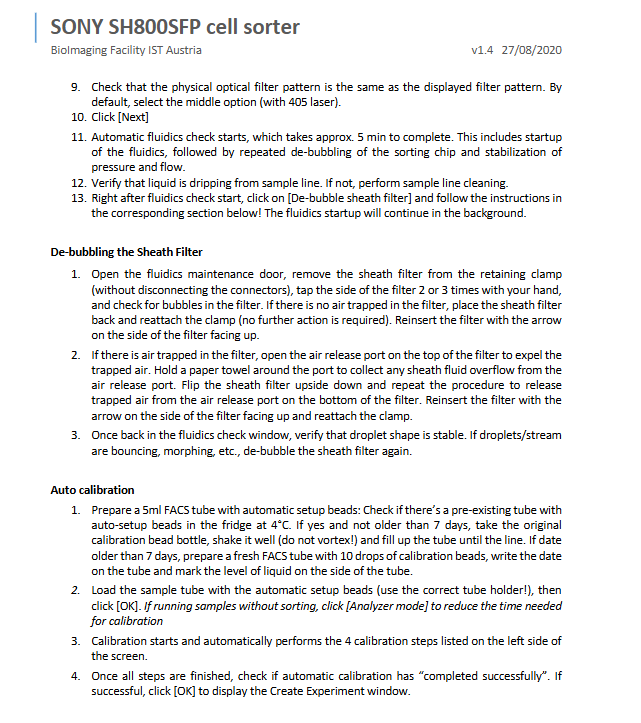
Perform an automatic flow path check for approximately 5 minutes and synchronize the removal of bubbles from the sheath fluid filter
Steps for removing bubbles from sheath fluid filter
Remove the filter and gently tap the exhaust, with the arrow facing upwards, and reinstall it
If there are bubbles, open the upper and lower exhaust holes to exhaust residual gas, and use a tissue to prevent overflow
Confirm that the droplet is stable without bouncing or deformation
Automatic calibration
Prepare calibration microspheres (stored at 4 ℃ for no more than 7 days)
Start automatic calibration after sample loading and complete 4 steps of calibration
After successful calibration, enter the experiment creation interface
Experiment creation and sample collection
Fill in experimental information, labeling, and fluorescent dyes
Select FSC/BSC/FL detection parameters
Run the compensation wizard as needed to adjust the detector and threshold
All samples must be filtered with a blue filter cap to prevent chip blockage
Shutdown process (must be thoroughly cleaned)
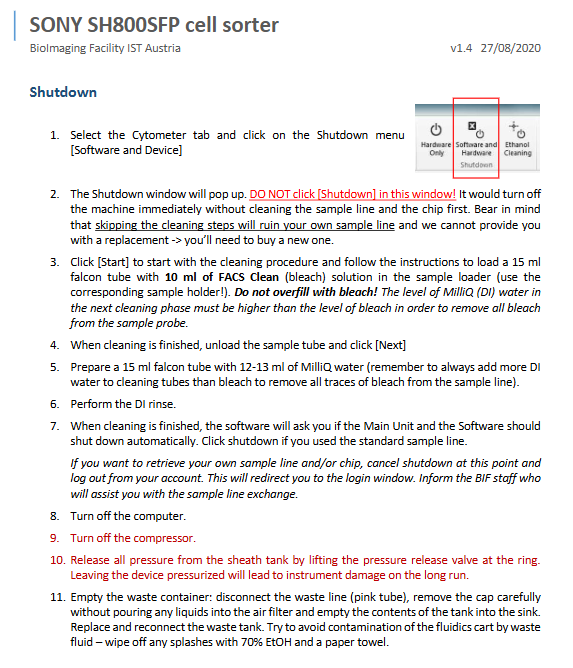
Enter the shutdown interface, do not shut down directly, start the cleaning process first
Clean the sample tubing with * * 10ml FACS Clean (bleach) * *
Rinse off residual bleach thoroughly with 12-13ml of pure water
After cleaning is complete, turn off the computer, and compressor
Relieve the pressure in the sheath tank, empty the waste liquid tank, and clean the fluid vehicle with 70% ethanol
Important usage restrictions
The replacement of the sample pipeline is only allowed to be operated by BIF staff, and an email application must be made 24 hours in advance
Pressure regulators are prohibited from being adjusted without authorization
Particles larger than the nozzle diameter will completely block the chip
Key issues
Question 1: What are the core checks that must be completed before SH800SFP is turned on, and what is the purpose?
Answer: It is necessary to check the liquid level and pressure relief of the sheath liquid tank, empty the waste liquid tank, clean the sorting chamber, check the bubbles in the sheath liquid filter, and check the DI water level; The purpose is to avoid bubble interference with the flow path, waste liquid overflow, and crystal contamination of the deflection plate, ensuring stable sorting and equipment safety.
Question 2: What are the key limitations of using sorting chips for SH800SFP? What consequences will non-compliance lead to?
Answer: Chips require QR code registration, which is only valid for 24 hours after registration; Do not touch the surface of the chip during installation; The sample must be filtered through a blue filter cap. Violation can lead to chip blockage, unstable droplets, sorting failure, and even chip scrap.
Question 3: Why can’t the SH800SFP be shut down directly? What is the standard cleaning procedure?
Answer: Directly shutting down the device can result in residual samples and bleach in the sample pipeline, causing blockages, corrosion, and damage to the pipeline. Standard procedure: First clean with FACS Clean bleach, then rinse thoroughly with sufficient pure water. After completion, perform shutdown, depressurization, and empty waste liquid.