Pro face GP-370 series human-machine interface (HMI)
Product basic information
Product Series: GP-370 Series (GP250 Upgraded)
Model:
GP370-LGxx-24V: Monochrome LCD
GP370-SCx-24V: Color STN LCD (8 colors)
Certification: UL/c-UL, CE, compliant with UL508, UL1604
Core specification parameters
Electrical specifications
Project parameters
Input voltage DC20.4-27.6V
Power consumption ≤ 20W (typical 10W)
Insulation resistance ≥ 20M Ω (DC500V)
Voltage withstand AC1000V/1min
Environment and Structure
Project parameters
Working temperature 0-50 ℃
Working humidity 20-85% RH (no condensation)
Protection level IP65f (dustproof, waterproof spray, oil proof)
Size 170.5 × 138 × 57mm
Weight < 900g
Display and Touch
Project parameters
Resolution 320 × 240 pixels
Backlight CFL, with a lifespan of 20000 hours
Touch 16 × 12 matrix, 1/2 point touch
Clock accuracy ± 40 seconds/month
interface
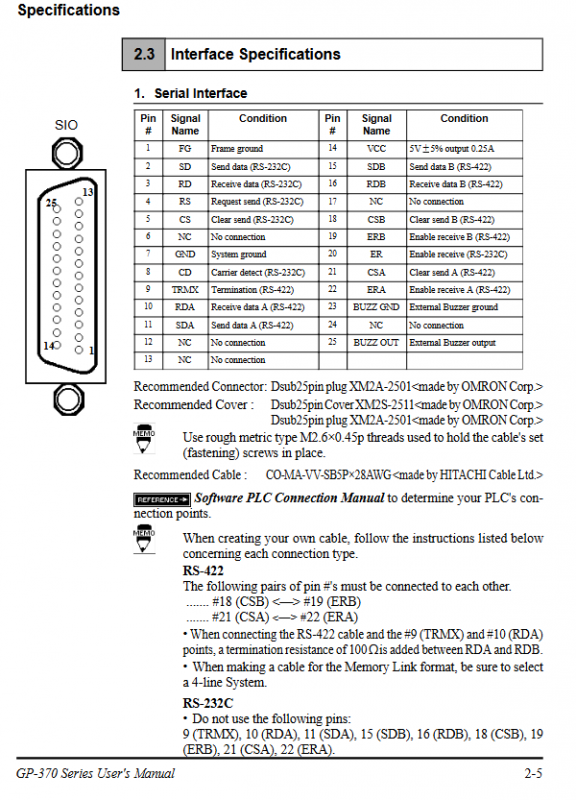
Serial: RS-232C/RS-422, baud rate 2400-38400bps
Tool port: used for downloading, barcode gun, and memory loading
Storage: 1MB FLASH EPROM, up to 320 images
System structure and accessories
Core components: GP host, programming software GP-PRO/PB III, PLC, communication cable
Connection method:
1: 1:1 HMI → 1 PLC
n: 1: Multiple HMI → 1 PLC
Standard accessories: installation bracket, sealing gasket, operation guide
Optional accessories: protective film, backlight, barcode reader, printer
Installation and wiring specifications
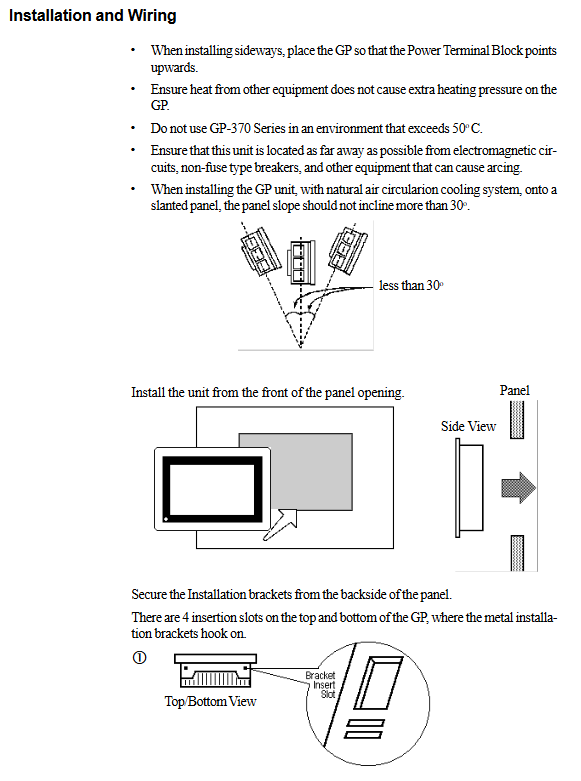
Installation requirements
Panel opening: 156 × 123.5mm
Surrounding distance: ≥ 100mm to ensure heat dissipation
Panel thickness: 1.6-5.0mm
Installation tilt: ≤ 30 °
Wiring requirements
Power off wiring, live operation is strictly prohibited
Grounding: Independent grounding is optimal, with a grounding resistance of less than 100 Ω
Cable: Separation of power and signal lines, grounding of shielded wires
Terminal torque: 0.5-0.6N · m
Operation mode (offline/running)
Off line Mode
Enter: Press the top left corner within 10 seconds of booting, or force reset
Menu: initialization, screen transfer, self diagnosis, operation
RUN Mode
Automatically enter upon startup and communicate in real-time with the PLC
Press the top left corner within 10 seconds to switch back offline
Initialization Settings (Core)
System environment: standby time, buzzer, password (0-9999)
Serial port settings: baud rate, data bits, parity, communication format
PLC settings
1: 1: Starting address and unit number of the system area
n: 1: Station number (0-15, cannot be repeated), network address
Other: Memory initialization, time and date, boot screen, font
Self diagnostic function
The testing items include:
Display screen, touch panel, internal storage, serial port, tool port
The result shows OK/NG, assisting in quickly locating hardware faults
Fault and error handling
Typical faults
No display: Check power supply, cables, backlight
Not communicating: protocol, baud rate, wiring, terminal resistance
Touch invalid: calibration, settings, hardware failure
Common error codes
SYSTEM ERROR: System malfunction
PLC NOT CONNECTED: PLC not connected
ILLEGAL EXPRESS: Address Overlap
CLOCK SETUP ERROR: Clock battery depleted
Maintenance and upkeep
Cleaning: Neutral cleaner, no organic solvents allowed
Regular inspection: temperature, humidity, voltage, wiring, sealing gasket
Backlight replacement: Model GP370-BL00-MS, operate with gloves when powered off
Clock battery: cannot be replaced by oneself, contact the agent
Key issues
Question 1: What are the two methods for GP-370 to enter offline mode? What is the function of a password?
answer:
Method 1: Touch the top left corner of the screen within 10 seconds of starting up;
Method 2: Force reset and press OFFLINE.
Password (0-9999) is used to protect initialization settings and prevent accidental modification of parameters and memory initialization.
Question 2: What is the difference between the 1:1 and n:1 communication methods of GP-370? What are the requirements for setting station numbers?
answer:
1: 1:1 HMI directly connected to 1 PLC, with simple configuration;
n: 1: Multiple HMIs share one PLC and communicate through tokens.
The station number must be between 0-15 and cannot be duplicated within the same network, otherwise a duplicate station number error will be reported.
Question 3: What process should be followed to troubleshoot the GP-370 no display fault?
answer:
Check if the DC24V power supply is normal;
Confirm if the power light is on and if the cable is properly connected;
Check if the screen data has been downloaded;
Enter offline mode to see if it is displayed and determine whether it is a screen or system issue;
Check if the backlight is damaged and replace it if necessary.