Zebra EPL2 Programming Language Programming Guide
Zebra EPL2(ELTRON ® The official programming manual of Programming Language is aimed at label printer developers, fully defining the EPL2 command syntax, parameters, formats, and usage rules. It supports text, one-dimensional barcodes, two-dimensional barcodes (QR/DataMatrix/PDF417/Aztec/MaxiCode), graphics, lines, form storage, variables/counters, RTC clocks, and other printing elements. It provides SGD (Set/Get/Do) configuration instructions and wired/wireless network parameters, covering serial/parallel/Ethernet/wireless settings, error codes, memory management, character sets (including China, Japan, and South Korea), and is suitable for desktop printers such as G-Series, 2844, 3842. The core is used for label template design, batch printing, variable printing, and automation control.
EPL2 core command system
1. Image and page control
Key parameters of command function
N Clear image cache None
Set label width (dots) from 0 to 65535
Q Set label length+spacing length, spacing, offset
Set the left and right margins, as well as the top and bottom margins, of the reference origin point (X, Y) for R
Z sets the printing direction T=forward/B=reverse
Number of printed copies and sets executed by P
XA automatic detection label size none
2. Text Printing (Command A)
Function: Print text, supporting built-in fonts 1-5 and Asian fonts 8-9 (Chinese, Japanese, and Korean)
Grammar: A x, y, rotation, font, aspect ratio, aspect ratio, reversed color, “content”
Support: Variables, counters, RTC time/date (TT/TD), expression calculation
3. Barcode printing
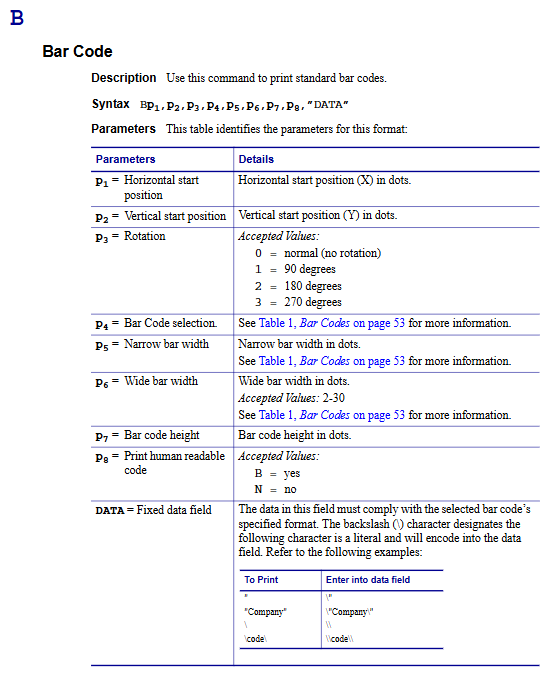
One dimensional barcode (B command)
Support: Code 39/128, EAN-8/13, UPC-A/E, Codabar, ITF, Postnet, etc
2D barcode (b command)
QR Code、Data Matrix、PDF417、Aztec、MaxiCode、Aztec Mesa
PDF417 supports Macro PDF large data splitting
4. Graphics and Lines
Command function
LO/LE/LW black/XOR/white lines
LS diagonal line
X box
GM/GG/GK stores/calls/deletes PCX graphics
GW directly writes binary graphics
5. Forms, Variables, and Counters
Form storage: FS (Save) → FE (End) → FR (Call) → FK (Delete)
Variable (V): Supports 00~99, maximum 99 characters, left/right/center alignment
Counter (C): 0~9, steps ± 1~9, used for serial number printing
AUTOFR: Automatically run forms upon startup, enabling offline printing
6. Printer system configuration
Command function
Printing speed (1-6 ips)
D printing density (0~15)
Y serial port settings (baud rate/checksum/data bits/stop bits)
Hardware options (cutter, peeling, sensor)
Fine adjustment of cutting blade position
C Cut the paper immediately
^@Printer reset
^Default factory reset
SGD (Set/Get/Do) configuration instruction
Format:! U1 setvar/getvar/do “Parameters” “Values”
Core purpose:
Setvar: Set network, serial port, and print mode
Getvar: query firmware IP、 Mileage and status
Do: Perform actions (clean the cutting blade, calibrate the sensor)
Support:
Network: IP, DHCP, FTP, HTTP, SNMP, TELNET
Wireless: SSID, Security, Roaming, Signal
Milemeter: total print length, print head lifespan, media count
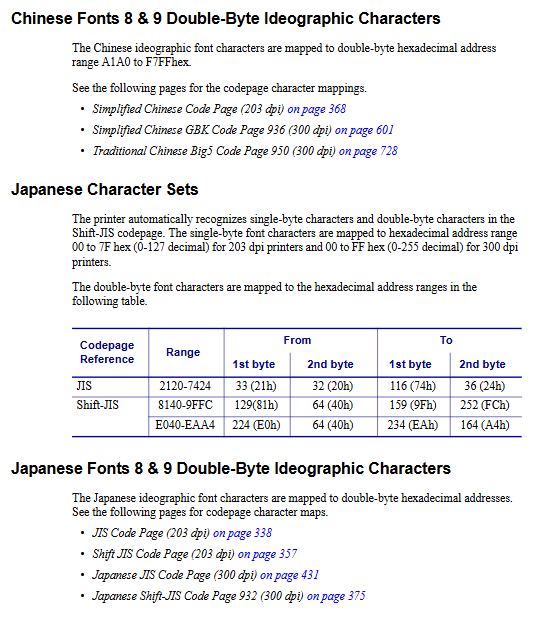
Character set and multilingual support
Latin characters: Code Page 437/850/852/1252
Asian Double Byte:
Simplified Chinese GBK 936
Japanese Shift JIS 932
Korean 949
Command: I select the code page; Set the spacing between Asian characters; Replace Euro symbol with oR
Error and Status Report
^Ee: Immediately return error code
Common errors:
00: No errors
01: Grammar error
03: Barcode data length error
07: Paper/ribbon shortage
11: Print head turned on
US/UT: Enable serial port error feedback (ACK/NACK)
Memory management
M: Allocate memory for forms/graphics/soft fonts
FI/UE/UG: Query Form/Font/Graphic Information
FK/GK/EK: Delete Forms/Graphics/Soft Fonts
Key questions and answers
Question 1: What is the most core tag template structure in EPL2? What are the minimum commands required?
Answer: The simplest template fixed structure is: N → q (width) → Q (length) → content (A/B/X, etc.) → P (printing). The cache must be cleared with N, the paper defined with q/Q, and finally output with P. Example: Nq400Q200,24A50,50,0,1,1,1, N, “Hello Zebra” P1
Question 2: How does EPL2 achieve continuous printing of serial numbers? What is the difference between a counter and a variable?
answer:
Counter (C command): dedicated to increasing/decreasing numbers from 0 to 9, supports stepping, suitable for serial numbers.
Variable (V command): can store any string, numbered from 00 to 99, used for custom content such as product name and batch.
Usage: Define V/C in the form first, use when printing? Incoming data, with reference method V01/C1.
Question 3: What is the relationship between EPL2 and SGD instructions? What scenarios are they used for?
answer:
EPL2: Used for label content design (text, barcode, graphics, forms).
SGD: Used for printer system configuration (IP, speed, density, network, status query).
Both can coexist but must be sent separately and cannot be written on the same line; SGD is here! Starting with U1, EPL2 directly starts with the command.