Mitsubishi GOT2000 series graphic operation terminal
Positioning and Applicable Scope
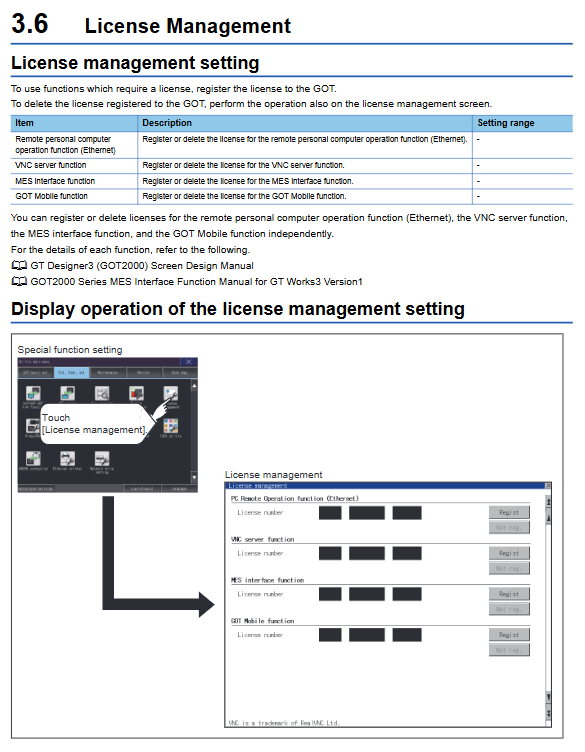
GOT2000 series HMI Utility function manual, covering:
Applicable models: GT27, GT25, GT23, GT21, widescreen/open frame/rugged models Handy GOT
Core uses: system configuration, communication settings, permission security, extended functions, maintenance diagnosis, data management
Supporting software: GT Works3/GT Modeler 3
Safety regulations (mandatory)
1. Warning
External hardware interlock must be configured, and GOT cannot be used as the only device for major security alarms
Backlight failure can cause touch abnormalities, and the failure logic varies among different models
Touch restrictions: GT27 prohibits touch with three or more points, and other models prohibit touch with two or more points simultaneously
Communication interruption can cause monitoring failure, and critical operations must be configured with physical switches
Network usage requires the deployment of firewalls VPN、 Antivirus protection against attacks
2. Attention (CAUTION)
Distance between communication line and power line * * ≥ 100mm**
Prohibit sharp objects from pressing the screen
Keep fixed IP blacklist: 192.168.0.18, 192.168.3.18
The installation torque strictly follows the model specifications: 0.20-0.50N · m
Power off operation, installation, wiring, and maintenance
Utility core structure (5 major modules)
Module 1: GOT Basic Setting
Covering 15 core configurations, the key parameters are as follows:
Key parameter description of the project
Display screen maintains 0-60 minutes, brightness 1-32, human body sensing supports backlight fault detection
Language options include Japanese/English/Simplified Chinese/Traditional Chinese/Korean font library
IP 0.0.0.0–255.255.255.255、 Ports 5014/5015 dual Ethernet ports, wireless independent configuration
Time SNTP/controller synchronization, GMT ± 13 time zone, supports battery power-off maintenance
Controller channels 1-4, 5V power supply, communication parameters support Mitsubishi’s full range of PLC drivers
Security level 0-15, operator accounts up to 1000 administrator/sub administrator levels
Module 2: Extended Function
SoftGOT-GOT link: Exclusive permission, priority 0-3600s
VNC Server: Operation Guarantee Time Setting
Backup/Trigger Backup: Maximum Backup Count 0-50, Support Time/Rising Edge Trigger
Video/RGB/Multimedia: NTSC/PAL, resolution 640 × 480/768 × 576
Wireless LAN: AP/Station mode SSID、 Channel and connection status viewing
IQSS/ANDON/Network Drivers: Integrating with Factory Informatization
Module 3: Maintenance Diagnosis
Provide complete self diagnosis capability, key items:
Batch self-test: power on time, system version, communication, history export
Touch calibration: Four point calibration to eliminate offset
System alarm: error code+message, supports reset
Inspection tools: drawing color deficiency, font, touch dead zone, RS232 self loop, Ethernet Ping
USB management: Secure pop-up to prevent data damage
Module 4: Monitor
Directly connect to the controller, supporting:
Equipment monitoring, ladder diagram monitoring (iQ-R/F/FX)
Network/Intelligent Module/Servo/Motion/CNC Monitoring
Log viewing, program editing, diagnostic wizard
Module 5: Data Control
Unified management of engineering and log data:
CSV export of alarm/recipe/log/operation records
Backup/restore, SRAM management, memory card formatting, bad block check
Supported drivers: A (SD), B/E/F/G (USB), N (network)
Key specifications and limitations
Operator account: GT27/25:1000; GT23:255 pieces
Security level: 0-15
Touch inspection unit: 16 × 16 dots
Maximum backup quantity: 0-50
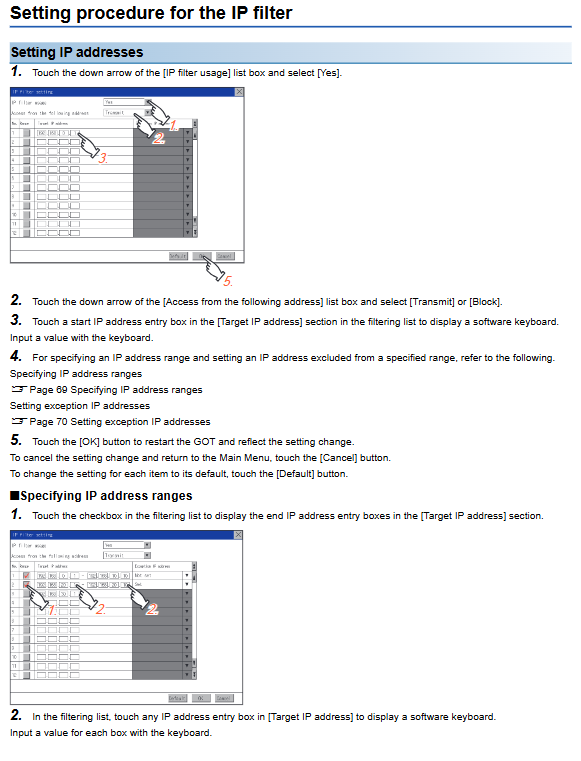
IP filtering rules: up to 32 entries
Wireless channel: Automatic/1-13
Key questions and answers
Question 1: What are the mandatory security restrictions for GOT2000 touch operation? What risks will violating lead to?
answer:
GT27: Do not touch 3 or more points simultaneously
GT25/GT23/GT21: Do not touch 2 or more points simultaneously
Risk: Multi touch can cause switch misoperation, output jumping, and device misoperation, which may result in personal injury or equipment damage; When the backlight fails, the screen darkens but the touch is still available, which can easily lead to unconscious operation.
Question 2: How does GOT2000 achieve multi-level permission and security management? What are the core configuration items?
answer:
Adopting a three-level system of administrator, sub administrator, and operator:
Administrator: Fully manage accounts, password policies, and security parameters
Sub administrator: Manage low-level operators with restricted permissions
Operator: Use the screen and functions according to the level (0-15)
Core configuration:
Authentication method: account password/external serial port/USB authentication
Automatic logout: 1-60 minutes
Password validity period: 1-1000 days
Continuous error locking: 3-10 failed locks
IP filtering: Allow/block access to specified addresses
Question 3: What are the three most commonly used functions in GOT2000 maintenance diagnosis? What problems should be solved separately?
answer:
Touch panel calibration
Solution: After long-term use, there are issues with touch offset and inaccurate points, which can be restored to accuracy through four point calibration.
I/O self loop check+Ethernet Ping
Solution: Communication failure, wiring error, parameter error, quickly locate hardware/configuration faults.
Batch self check+system alarm
Solution: Crash, black screen, abnormal restart, abnormal driver, export logs for after-sales analysis.