Beckhoff CP69xx Industrial Embedded Control Panel
Product Overview
1. Hardware configuration and appearance
Display screen specifications: 5.7/6.5/12/15/19 inches in multiple sizes, corresponding to different resolutions and screen ratios.
Body structure: Steel plate shell+aluminum alloy front panel, standard with rear rotatable clamping wrench, supports quick embedded installation of control cabinet, no loose accessories.
Panel types: divided into four styles: no keys, function keys, numeric keypad, and full letter keyboard. Some keys are equipped with programmable orange LED indicator lights.
Power supply: Standard 24VDC DC power supply.
2. Interface definition (all located in the interface area at the bottom of the device)
The whole machine has 5 sets of standard interfaces, with complete pin definitions:
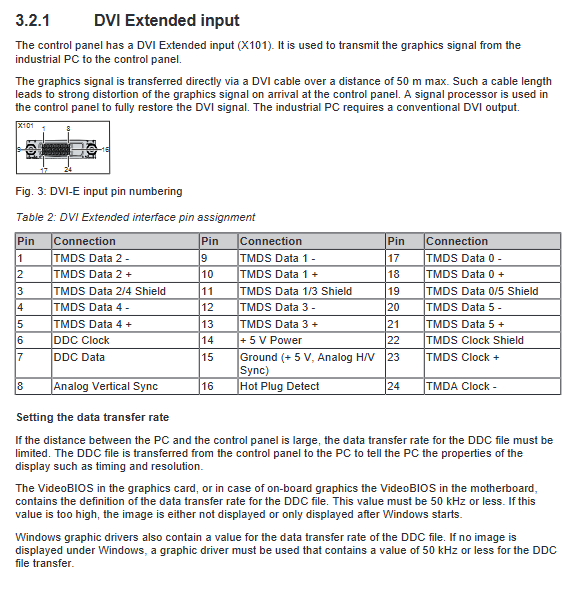
X101 (DVI Extended): Extended DVI video input for transmitting industrial computer image signals, with a maximum transmission distance of 50m; for long-distance use, the DDC transmission rate of the graphics card/driver needs to be set to * * ≤ 50kHz * *, otherwise there may be no image.
X102 (USB Extended): RJ45 interface, combined with CU8801 converter to achieve USB 2.0 signal extension, can transmit up to 50m with the help of Category 5 Ethernet cables, and cannot be connected to Ethernet switches/hubs.
X103 (Standard USB Input – B Port): Directly connected to industrial USB interface, maximum wiring distance of 5m, compatible with USB2.0.
X104/X105 (USB output – A port): Two USB interfaces for external devices, compatible with USB 2.0.
X106 (5-pin power interface): 24VDC power supply+protective grounding; Pin 3 is grounded, Pin 4 is negative, Pin 5 is positive, and Pin 1/2 is empty; The maximum compatible wire diameter is 1.5mm ², and the matching plug model is C9900-P927.
3. Status indicator lights (6 in total)
3/4 lights: correspond to the working status of two USB interfaces respectively;
Lamp 5: The power supply voltage is normal;
Lamp 6: 24V power supply has been connected;
Lamp 1/2: No function.
4. Nameplate information
The nameplate indicates the equipment model (the last four digits are the equipment generation), serial number, production date, screen/touch/power specifications, interface identification, various certifications (CE/EAC/UKCA/FCC), manufacturer information, etc.
5. Button functions
Covering the entire series of standard buttons: directional keys Home/End、PgUp/PgDn、Tab、Del/Ins、Enter、Backspace、Shift/Caps Lock/Ctrl/Alt、Esc、F1-F12 Function keys, etc; System shortcut keys can trigger system menus and property windows; The logic of function keys and dedicated keys is defined by TwinCAT software.
6. Supporting cable kit
Provide multi specification DVI+USB cable sets, covering lengths of 1m~50m. Some long-distance kits come with USB signal converters and Category 5 network cables; Simultaneously supporting the optional conversion of DisplayPort to DVI cables to meet the interface requirements of different industrial control computers.
Equipment debugging and installation (commissioning process)
1. Transportation and unpacking
The equipment is anti vibration but not resistant to strong impacts and severe temperature differences, and must be transported in its original packaging.
When condensation occurs due to a large temperature difference, it needs to be allowed to stand for 12 hours before being powered on.
After dismantling, check the goods and inspect the appearance for damage. If there are any abnormalities, immediately contact Beifu after-sales and keep the original packaging.
2. Installation requirements for control cabinet
The wall thickness requirement for cabinet openings is 2-5mm, and the equipment must be installed vertically to ensure ventilation.
The installation position should avoid strong light reflection and direct sunlight to ensure the viewing angle of the screen.
Installation steps: Insert the panel into the cabinet opening → Use a 3mm hex wrench to externally rotate the clamping wrench 90 ° → Tighten and fix.
3. Cable and plug assembly
Focus on introducing the assembly and disassembly steps of the 5-pin power plug and stress relief housing, including standard operations such as wire core stripping, crimping wire nose, terminal wiring, and buckle fixation.
4. Grounding specifications
Protective grounding and functional grounding must be implemented, with a grounding wire cross-sectional area of ≥ 4mm ², to ensure personal safety and EMC electromagnetic compatibility.
Following the EN 60204-1 standard: supplying 0V and PE equipotential, keeping the external equipment potential consistent.
5. Wiring sequence and power supply requirements
Operation sequence: First complete grounding → connect all data cables → finally connect 24VDC power supply.
Power supply parameters: Input voltage range 22-30VDC, equipment terminal voltage shall not be lower than 22V; maximum power supply circuit fuse 4A.
Special note: Industrial control computer UPS output power supply can be used (only for single panel docking) to ensure continuous display of the screen after power failure.
6. Touch screen usage and protection
Operation requirements: Only operate with bare hands or wearing gloves without hard particles, and do not touch sharp hard objects.
Protective film: Original factory protective film is optional, and the document provides detailed standard steps for applying and removing the film.
Auxiliary tools: Brightness, screensaver, and cleaning modes can be set through the Display Control Tool.
Equipment shutdown, disassembly, and scrapping
1. Power off and rewiring process
Normal shutdown → Cut off external 24V power supply → Remove power connectors and data cables in sequence → Finally disconnect the grounding; Operation is prohibited during thunderstorms.
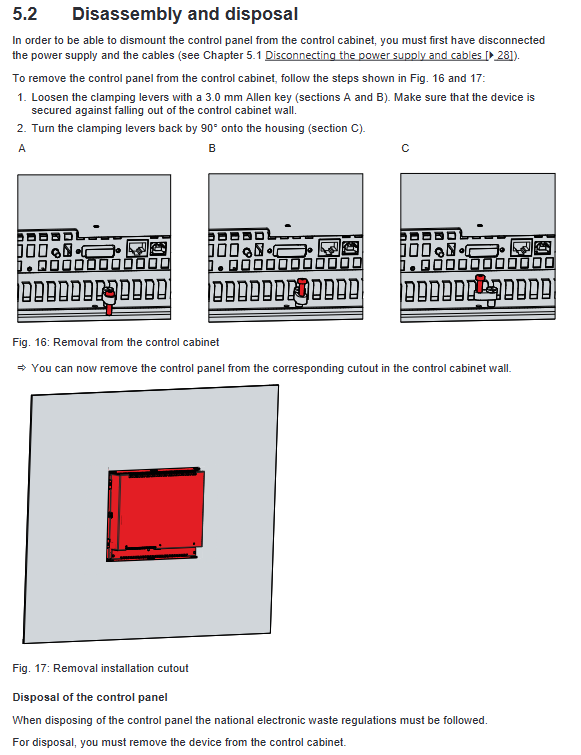
2. Cabinet disassembly
First loosen the clamping wrench, rotate and reset, and then remove the panel; Take measures to prevent falling during the entire dismantling process.
3. Scrap disposal
After disassembling the entire machine, strictly follow the local electronic waste regulations for classification and recycling.
Daily maintenance and cleaning
Cleaning rules
It can be cleaned with electricity, and the cleaning mode needs to be turned on through the Beckhoff Control Tool (duration adjustable from 5 to 120 seconds) to prevent accidental contact.
Cleaning agents such as glass water, alcohol, gasoline, etc. can be used; It is strictly prohibited to use abrasives, steel wires, high-pressure water guns, steam equipment, and compressed air.
Avoid dust from entering through the back interface during cleaning, and maintain an ambient temperature of 0-55 ℃.
Repair instructions: The device does not have any parts that can be repaired by the user. If there is a malfunction, please contact the official after-sales service.
Note: Pixel defects on TFT screens are a normal production phenomenon and cannot be used as a basis for malfunction.
Troubleshooting
Organize common faults, causes, and corresponding solutions:
Cause and solution measures for fault phenomena
The panel has no response at all. The power supply has been interrupted and the cable has malfunctioned. Check the power supply and wiring, but if there are still abnormalities, contact after-sales service
Black screen/intermittent brightness and darkness, partial failure of backlight damage, internal hardware malfunction. Contact after-sales maintenance for repair
Touch screen malfunction, poor grounding, operator not effectively grounded, re grounded reliably, operator wearing normal shoes and socks in contact with the ground
TwinCAT USB communication error system cycle defaults to 10ms, adjust cycle to 50-80ms
Core technical parameters
Electrical parameters: rated 24VDC, working voltage 22-30VDC, NEC Class 2 standard.
Protection level: IP65 on the front and IP20 on the back.
Mechanical performance: Complies with EN 60068 standard, has designated anti vibration capability, and can withstand 5G impact (lasting for 30ms).
Electromagnetic compatibility: anti-interference EN 61000-2, radiated emission EN 61000-4.
Temperature and humidity: working temperature range of 0-55 ℃, storage and transportation temperature range of -25~65 ℃; Relative humidity ≤ 95%, no condensation.